
UI template: HTML5 Mobile Float

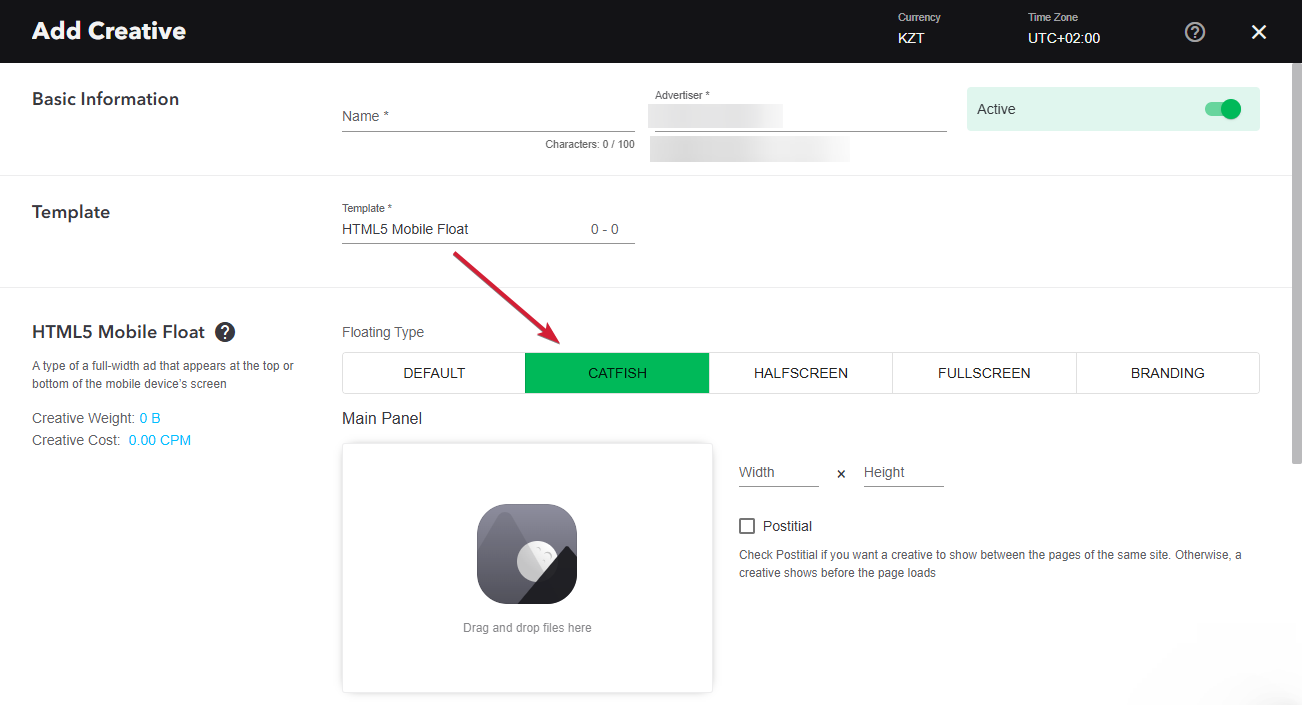
Mobile Catfish (HTML5) is a floating ad for mobile devices. It is fixed to the bottom of the screen, spans the full screen width, and stays visible while the user scrolls the page content. The user can close the ad with the close button; a tap anywhere else on the ad opens the landing page and closes the banner.
Supported platforms
| Desktop | Tablet | Phone | |||
|---|---|---|---|---|---|
| Windows | Mac | iOS | Android | iOS | Android |
| - | - | Supported | Supported | Supported | Supported |
Inventory compatibility:
Local inventory (direct publisher zones) only.
Format requirements
| Element | Requirement |
|---|---|
| Main panel | Width: 100% of the screen Height: up to 30% of the screen height |
| Position | Fixed to the bottom of the screen, centered horizontally |
| Close button | "X" in the upper right corner of the panel, at least 24×24 px |
| Click area | The whole panel except the close button |
| File size | Up to 50 MB |
| Images | .jpg, .png, .gif, .svg formats are recommended |
Download an archive with the template:
How to work with archive (template)
- Unpack an archive with a creative template.
- For creative preview, use the preview page or copy all files to a folder index – banners – banner – body, and open the index.html in a browser using localhost. For that, a web server has to be installed (e.g., IIS for Windows, Apache for Mac OS).
Additionally, you can check the preview of the creative by copying the link to it and viewing it from your mobile device. - Open the file body.html with the text editor and edit the code snippet inside tags <body> </body>.
- Edit a file body.js.
- Save and archive all banner assets in .zip (you should archive the files, not the folder that contains the files).
Asset requirements
ZIP archive
The banner with all banner assets should be archived as a .zip file. Use the .zip file with the template.
HTML file
The HTML file must define all used sources (libraries, images, etc). A required file name is body.html.
API connection and usage
globalHTML5Api connects automatically, requested in the following way.
- Expand the globalHTML5Api code
globalHTML5Api objects and methods should be defined inside a called function. All used modules should be listed as function parameters. This format requires no modules. A sample of globalHTML5Api.init usage for the Mobile Catfish format looks the following way.
- Expand the globalHTML5Api.init example code
globalHTML5Api.init Parameters
| Key | Properties | Type | Description | |
|---|---|---|---|---|
| resize | – | Array | Array of objects | |
| name (required) | String | Object name. Each object presents a particular container state (resizeState) | ||
| fixed | – | Object with properties. Describes the container position relatively to a browser window | ||
| vertical (required) | bottom | The vertical alignment of the container | ||
| horizontal (required) | center | The horizontal alignment of the container | ||
| width (required) | String|Number | Banner container width | ||
| height (required) | String|Number | Banner container height | ||
globalHTML5Api Methods
| Method | Arguments | Type | Description |
|---|---|---|---|
| click(URL) | – | – | Method to call the clickthrough. Target URL may be set as a parameter or from the user interface. The URL set in the code has a higher priority than the URL set from the UI, which can lead to a conflict. Therefore, it is mandatory to use only one of the available methods. |
| URL (optional) | String | Target URL | |
| src(URL) | – | – | Method returns the absolute path to file |
| URL (optional) | String | Relative path to file | |
| close(preventEvent) | – | – | Method to close the banner. In the template, it is called after the click with the value true, so that the banner closes without sending the close event. |
| preventEvent (optional) | Boolean | Prevents sending a tracking event close (banner closing). If the value is false, the event will be sent. Default: false |
Event tracking
- View
- Confirmed view
- Click
– Uses the main thread for more than 60 seconds in total
– Uses the main thread for more than 15 seconds in any 30-second window
– Uses more than 4 megabytes of network bandwidth
For any questions regarding ad manuals, please contact the support manager of your account.