
Admixer RTB-Stack
Inventory
Demand
Reporting
Deals management
Settings
Android SDK Setup
Unity SDK Setup
Marketplaces
Processing logic
Creative Factory
The Creative Factory allows you to upload and configure banners that can then be linked to your Direct Profiles for delivery.
To use Direct Profiles and the Creative Factory, the Direct Demand module must be enabled for your account. If you do not have access to these features, please contact your Account Manager.
Adding a New Creative
To begin, click the + Add Creative button in the top right corner of the Creative Factory menu.
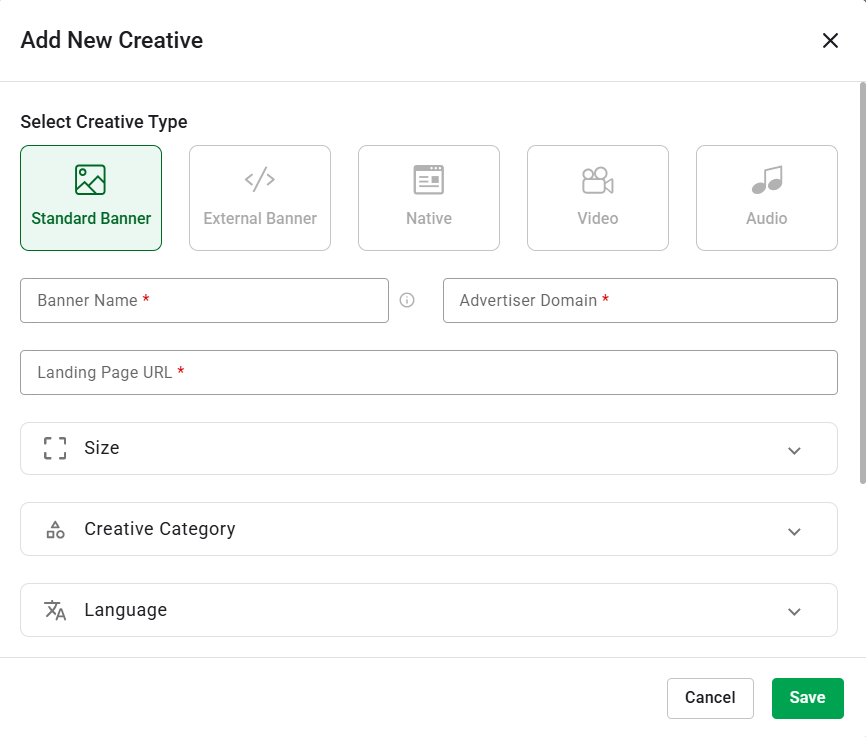
- Creative Type: Select Creative Type. Currently, only the Standard Banner type is available and is selected by default. Other creative types (Native, Video, Audio) are currently disabled.
- Banner Name (required): Enter a name for your creative. The name is capped at 130 characters. If you enter or paste a longer name, the system will automatically truncate it to the first 130 characters.
- Advertiser Domain (required): Enter the official domain of the advertiser (e.g., advertiser.com).
- Landing Page URL (required): Enter the destination URL where users will be directed when they click the banner.
- Size (required): Select a dimension from a list organized from smallest to largest banner size. If your size is not in the list, you can manually type it using "x" between numbers (e.g., 400x500). Limitations: use whole numbers only; zeros and decimals are not allowed. You can only select or type in one set of dimensions per creative.
- Creative Category (required): Select between 1 and 3 categories for your banner. Once 3 categories are selected, the list becomes disabled for further selection. If you check a parent category group that contains more than 3 sub-categories, the system will automatically select only the first 3 sub-categories in alphabetical (A-Z) order.
- Language (required): You must select one language that matches the content of your creative.
- Creative Upload (required): You can either click the area to browse files or use drag & drop. The system accepts .png, .jpg, and .jpeg files. Once the upload is successful, a visual preview of the banner will be displayed directly in the modal.
Updated on January 19, 2026